

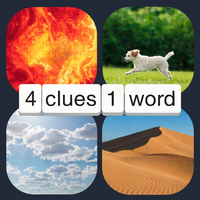

Pics 2 Word is a four-picture word puzzle where you study visual clues, choose letters, and find the single word connecting all four images.
Here's a quick look at the game:
Pics 2 Word is a picture-based guessing game where four images point to one hidden word. You examine what the pictures show, work out the connection between them, and select letters from the available choices to complete the answer.
What is Pics 2 Word?
Pics 2 Word turns visual clues into short vocabulary puzzles. Every round presents four pictures, a set of empty answer boxes, and a selection of letters. All four images are connected by one word, and your task is to discover it.
The connection is not always based on four pictures showing exactly the same object. Pics 2 Word can use different meanings of one word. For example, a bat could appear as sports equipment in one picture and as the flying animal in another. Recognizing that shared word is the main challenge.
Once you know the answer, select its letters in the correct order. A correct solution completes the puzzle, rewards you with coins in the browser version, and moves you to the next set of four pictures.
There is no character movement or complicated control scheme. Pics 2 Word is mainly about observation, vocabulary, and finding relationships between images.
Game Overview
| Feature | Details |
|---|---|
| Genre | Word, guessing, puzzle |
| Main Goal | Find the word connecting four pictures |
| Clues | Four images per puzzle |
| Answer Method | Select letters to fill the answer boxes |
| Help | Letter-revealing hints |
| Mistake Tools | Back and Clear buttons |
| Reward | Coins for correct answers |
| Platform | Web browser |
| Technology | WebGL |
| Devices | Desktop and mobile |
| Controls | Mouse or touchscreen |
| Players | Single player |
| Developer | Not clearly listed consistently |
Pics 2 Word is available as a browser game, so you can start playing without installing desktop software. Browser versions support both computers and touchscreen devices.
How to Play Pics 2 Word
The rules of Pics 2 Word are simple, but later puzzles require more careful interpretation. Your goal is always to identify the single word that makes sense for all four images.
Study All Four Pictures
Begin by looking at every image rather than focusing only on the first one.
Ask what each picture represents. Consider the obvious object first, but also think about actions, locations, colors, professions, expressions, and alternative meanings.
If one image seems unrelated to the other three, it may actually be the most useful clue. Pics 2 Word often becomes easier when you find a word that can describe two very different-looking pictures.
For example, an image of sports equipment and an image of an animal could share the same name. The visual relationship does not need to be literal.
Check the Answer Length
The empty boxes show how many letters you need.
Before testing a guess in Pics 2 Word, compare its length with the number of answer spaces. If there are four boxes, a five-letter idea can be discarded immediately.
This is one of the fastest ways to narrow a difficult puzzle. The images tell you what the word could mean, while the answer boxes tell you what the word must look like.
Use the Available Letters
Below the pictures, Pics 2 Word gives you letters that can be used to spell the solution.
Select a letter to place it into the next empty answer box. Continue choosing letters until you have built the full word.
You do not need to type the answer with your keyboard. The standard interface uses the letter buttons displayed on the screen.
Extra letters can make the correct spelling less obvious, so it helps to decide on a likely answer before clicking randomly.
Correct Your Answer
If you select the wrong letter, you do not need to restart the entire puzzle.
Use Back to remove the most recently entered letter. If your whole guess is wrong, use Clear to empty the answer boxes and start again.
These controls are particularly useful when you recognize the correct word halfway through an incorrect attempt.
Complete the Word
When you enter the correct solution, Pics 2 Word advances to another four-picture puzzle.
In a documented browser build, a correct answer awards 25 coins. Those coins become useful when you encounter a picture combination that you cannot solve normally.
Controls
Pics 2 Word uses straightforward mouse and touchscreen controls.
| Action | Control |
|---|---|
| Select a letter | Left-click or tap the letter |
| Build an answer | Select letters in the correct order |
| Remove last letter | Press Back |
| Remove the whole guess | Press Clear |
| Reveal help | Press Hint |
| Navigate menus | Click or tap the on-screen buttons |
On desktop, you can play Pics 2 Word entirely with a mouse. On a phone or tablet, tap the letters and interface buttons directly.
WASD, arrow keys, and movement controls are not required.
Hints and Coins
Pics 2 Word includes a hint system for puzzles where the connection between the pictures is difficult to recognize.
A hint reveals one letter of the hidden answer. In the browser build that uses the coin system, a hint costs 40 coins, while players start with 50 coins.
Because solving a normal puzzle awards coins, completing answers without help allows you to build a larger reserve for harder stages.
This creates a simple decision: spend coins now or continue analyzing the four images yourself.
Hints are most useful when you already have part of an idea. A revealed first or middle letter can confirm which meaning of the pictures you should pursue.
Exact reward values or interface details may differ between published versions of Pics 2 Word.
Tips for Solving Pics 2 Word
- Use all four pictures. An answer that explains only one or two images is probably incomplete.
- Check the number of letters early. Word length removes many otherwise reasonable guesses.
- Look for double meanings. One word may refer to completely different objects or ideas.
- Name each image separately. Mentally list two or three words for each picture and look for overlap.
- Use the supplied letters as another clue. If your guessed word requires a letter that is not available, reconsider it.
- Avoid random clicking. It is usually faster to identify a possible word before entering letters.
- Save hints when you can. Easy puzzles let you collect coins that can help with more difficult Pics 2 Word levels.
- Use Back for small mistakes. Clearing the entire answer is unnecessary when only your last letter is incorrect.
- Reinterpret the strangest image. If three pictures seem connected but the fourth does not, think about another meaning of your proposed word.
A Better Way to Read the Picture Clues
When a Pics 2 Word puzzle seems confusing, describe every image in several ways.
Suppose you see a picture containing a person running. Do not limit yourself to "runner." Other possibilities might include race, track, sport, speed, exercise, or run.
Repeat this process for the remaining images. Eventually, one description may appear in more than one list.
You can then test that candidate against the answer length and available letters.
This method is much more reliable than trying to guess directly from the overall appearance of the screen.
Think About Homonyms and Multiple Meanings
Pics 2 Word can use a word because it applies to pictures in different contexts.
A good example is bat. The word can describe an animal, but it also describes equipment used in sports. Pictures representing those different meanings can still point to exactly the same answer.
When four images seem too different to share one subject, search for a word with several meanings.
Start With the Most Specific Picture
Some images are broad. A picture of a person outdoors might represent walking, nature, travel, park, summer, or many other ideas.
Another picture may contain a very distinctive object with only a few common names.
Start with the specific clue, list possible words for it, and test those words against the other three pictures. Pics 2 Word becomes much easier when you reduce the number of interpretations you need to consider.
How Pics 2 Word Gets Harder
The basic rules stay the same throughout Pics 2 Word. Difficulty increases through the clues rather than through new movement mechanics.
Early connections may be easy to identify because the pictures strongly suggest the same familiar word. Harder puzzles can rely on less obvious meanings or images that support several interpretations.
Distracting letters can also make uncertain answers harder to spell. You might understand the general connection but still need to find the exact word intended by the level.
As a result, progress depends more on improving your observation and vocabulary than learning new controls.
Can You Play Pics 2 Word Online?
Yes. Pics 2 Word can be played directly in a compatible web browser.
The browser edition uses WebGL and is available for desktop and mobile play. You can use a mouse on a computer or touchscreen controls on a supported phone or tablet.
You do not need to download the browser version before starting. Some hosting platforms also provide a fullscreen option.
There are other mobile games with similar names, including older picture-combination word apps, so their puzzles and features should not be assumed to match this four-images-one-word version of Pics 2 Word.
Who Is Pics 2 Word For?
Pics 2 Word is best suited to players who enjoy visual riddles, vocabulary tests, guessing games, and four-pictures-one-word puzzles.
You do not need quick reactions. You can spend your time studying each picture, checking the letters, and testing possible connections.
That also makes Pics 2 Word approachable for short play sessions. A single puzzle has a clear objective, and you can immediately see whether your interpretation of the images was correct.
The game can also test vocabulary in an unusual way because you are often looking for alternate meanings rather than simply spelling a word from a written clue.
Why Players Keep Playing
The main satisfaction in Pics 2 Word comes from recognizing a connection that was not obvious at first.
Four pictures may initially look unrelated. Once you identify the hidden word, every image suddenly makes sense. That quick shift from uncertainty to recognition is the core puzzle loop.
Later levels can also encourage you to conserve coins, decide when a hint is worthwhile, and become better at interpreting visual clues without assistance.
Pics 2 Word keeps its controls simple and lets the picture relationships provide the difficulty, making it easy to start while still leaving room for tougher vocabulary puzzles.
FAQ
What is Pics 2 Word?
Pics 2 Word is a word puzzle where four pictures are clues to one shared hidden word.
How do you play Pics 2 Word?
Study the four pictures, determine what word connects them, and select the available letters in the correct order.
Can I play Pics 2 Word online?
Yes. Pics 2 Word has a browser version that runs on compatible desktop and mobile devices.
Does Pics 2 Word have hints?
Yes. You can use a hint to reveal a letter when you cannot identify the hidden word.
What do Back and Clear do?
Back removes your most recent letter, while Clear removes your entire current answer.
Is Pics 2 Word a multiplayer game?
No multiplayer mode is clearly listed; the browser version is presented as a single-player word puzzle.